


Help · included, at no extra cost
Help and support
inside the panel itself
Step-by-step guides, an assistant that knows how things stand in your restaurant and, if it really doesn’t know, a ticket answered by a person. Without phoning anyone and without leaving the screen.
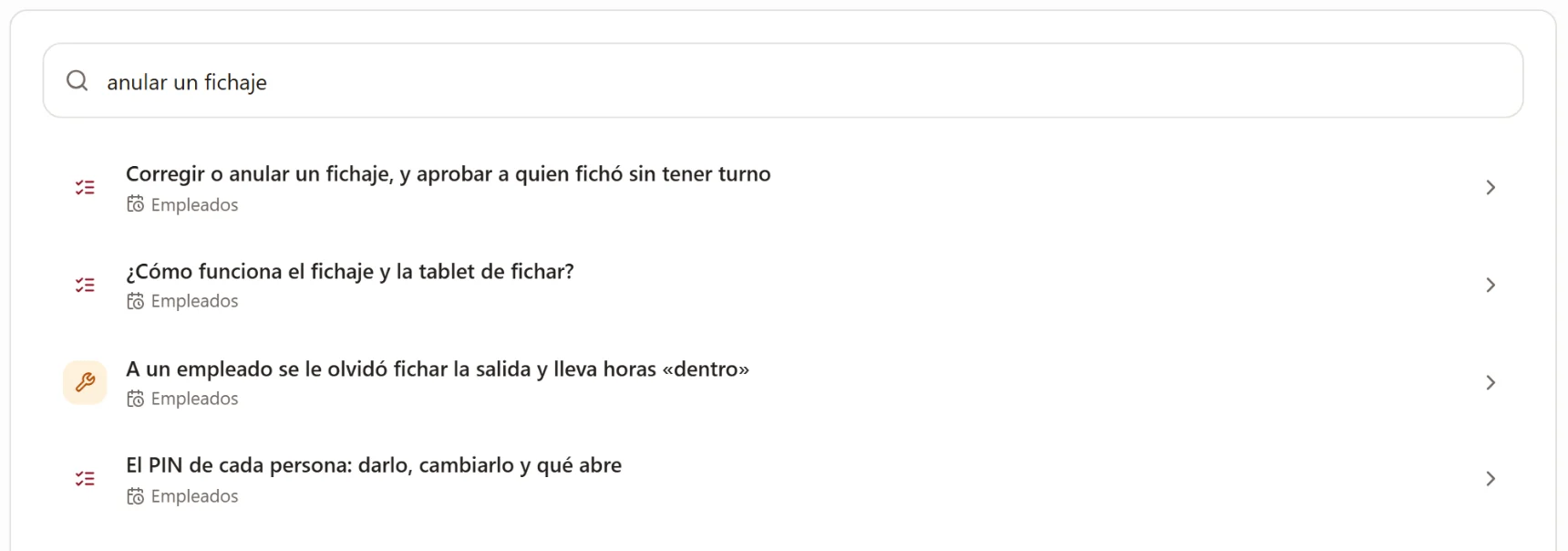
A day with it
Three levels, always in this order, and only with what’s yours.
The guide
You describe what’s happening in your own words (“no orders are coming in”, “void a clocking”) and up comes the guide with the steps. The search copes with spelling mistakes and synonyms, because nobody types properly in a rush.
The assistant
If the guide doesn’t get you there, the assistant answers by looking at your restaurant: if you have delivery switched off, it tells you so, instead of explaining a screen you don’t have.
The ticket
And when it really doesn’t know, it says so and opens a ticket with the context already in it. A person answers it, not another robot.
And what you see depends on what you have
The guides that come up are the ones for what you’ve signed up for, and an employee only gets the ones for the sections you’ve given them. Nobody reads instructions for a screen they can’t open.
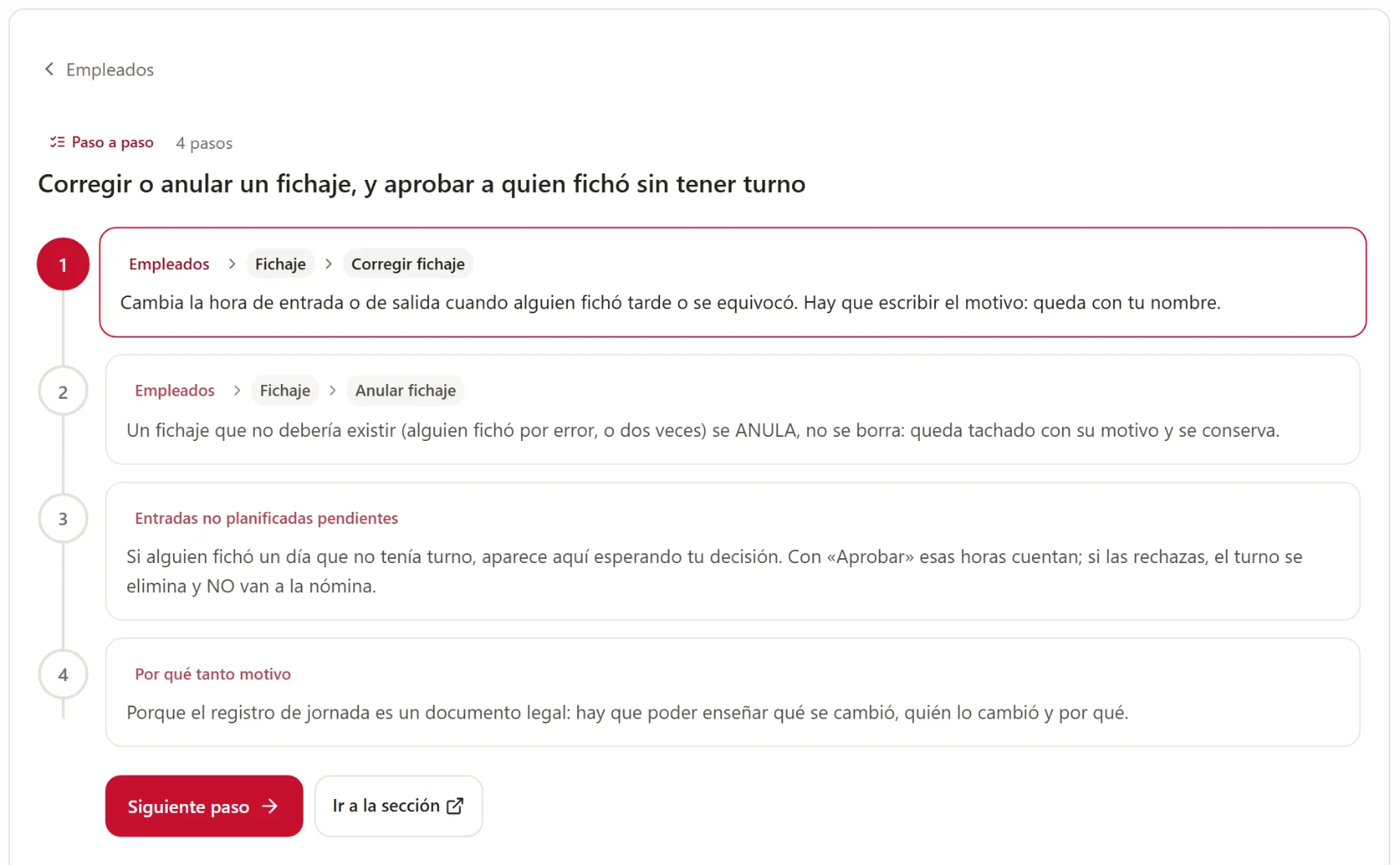
An open guide. Each step says where to tap, with the button’s name exactly as you see it on your screen and in your language.
What it solves
Why this isn’t “a help section”.
“The program’s help talks about buttons I don’t have.”
Not here. If you haven’t signed up for delivery, the delivery guides don’t appear: not in the search, not in the index, and not in the assistant’s answers.
“I search for ‘the tip jar’ and it finds nothing.”
The search understands how people talk behind a bar: synonyms, single words and the odd spelling mistake. And if it still finds nothing, it offers you the assistant instead of leaving you with an empty screen.
“A robot answers me with generalities.”
The assistant is built from real faults, not brochures: what actually breaks in a restaurant and what to check first. And it separates what’s on your side from what’s on ours.
What it doesn’t do
Four things it doesn’t do.
We’d rather you found out here than in your second week.
The assistant touches nothing.
It reads your restaurant to answer you, and that’s it. It doesn’t change prices, accept orders or delete anything. Whatever needs doing, you do.
It doesn’t know about anything outside the panel.
It isn’t going to advise you on your collective agreement, your accounts or your lease. If it tells you it doesn’t know, it’s because it doesn’t know.
It doesn’t see anybody else’s restaurant.
It answers with your data and only yours. What another restaurant has asked doesn’t exist for you, and yours doesn’t exist for them.
The watchdog alerts, it doesn’t fix.
It checks every restaurant every fifteen minutes and alerts us to anything left half-done. What it can change on its own is a very short, reversible list, and it’s switched off by default.
How it fits in
The help goes with whatever you have.
It isn’t a separate module and it costs nothing extra: it comes with the panel and fills up according to your plan.
POS and handheld
The floor guides: splitting a bill, removing a dish already served, cashing up the till, tips.
Staff
The rota and clocking ones, including correcting or voiding a clocking, which always requires a reason.
Orders and delivery
The ones for a day of orders: accepting, printing, refunding, and what to check when none are coming in.
What you need
Nothing.
It’s included
With the panel, whatever combination you have. It isn’t a separate support plan.
In six languages
The guides and the assistant use whichever language your panel is set to.
For your team too
An employee sees the guides for their sections, without you having to explain anything.
And nothing to install
It’s inside the panel, on the help button.
FAQ
What people ask us about support.
Does support cost extra?+
No. The guides, the assistant and the tickets come with the panel.
Who answers the tickets?+
A person from our team, with your ticket and the context in front of them. The assistant only prepares the draft so you don’t have to explain everything again.
Can the assistant see my sales?+
No. It sees how your restaurant is set up and how many orders and reservations there are today, not the amounts. Nor does it see passwords, payment details or anything from another restaurant.
And if the help is wrong or something is missing?+
Open a ticket and we fix it. The guides are written from what people actually ask, so a gap spotted by a manager is worth more than ten pages written for the sake of it.
What is the watchdog?+
An automatic check of every restaurant every fifteen minutes: if something has been left half-done (an order stuck, a print job jammed), we get an alert so we can look at it before you notice. What it can fix on its own is a short, reversible list, and it’s switched off by default.
The demo
We’ll show you the help with your own panel in front of you.
Half an hour, no strings attached and nothing to install. If it’s not right for you, we’ll tell you.